Environments
Every project on Dropsolid AI runs on a standard development, staging, and production topology, provisioned automatically through the Dropsolid Platform. For larger teams, environments can be managed independently through the Platform UI, giving developers self-service control without waiting on ops for every change, test, or release.
A clear path from code to production
What works in staging behaves the same way in production, so releases carry fewer surprises.
Standard three-stage topology
Development, staging, and production environments follow a consistent structure across every project, so teams always know where a change is in its lifecycle, from first commit to live release.
Automated provisioning
Environments are provisioned through the Dropsolid Platform rather than configured manually, removing setup time and reducing the chance of configuration drift between environments.
Self-service management
Teams manage their own environments directly through the Platform UI, creating, updating, or reviewing environments without filing a ticket with ops.
Data & code sync between environments
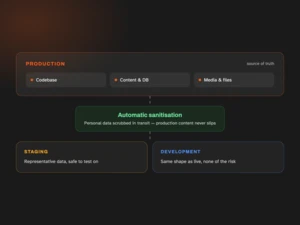
Sync code and content between environments to keep staging and development representative of production, so what your team tests is what your users will actually see. The content is also automatically sanitised while syncing so that production data doesn’t slip.
On-demand / feature environments
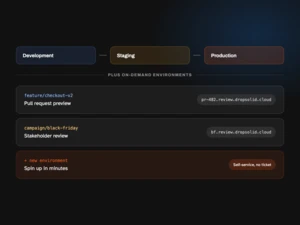
Beyond the standard three environments, teams can spin up additional on-demand environments for individual features, campaigns, or pull requests, giving stakeholders a live URL to review before anything merges to production.
CI/CD & governance
Environment provisioning integrates with your development workflow, so code moves from development to staging to production through a predictable, auditable path, supporting the same governance and compliance standards that apply across the rest of the Dropsolid Platform. Access the entire CI/CD pipeline via Dropsolid AI’s optimized Gitlab.
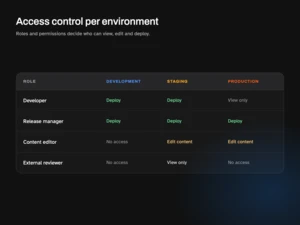
Access control per environment
Control who can access, edit, deploy to your environments using our roles and permissions system.